
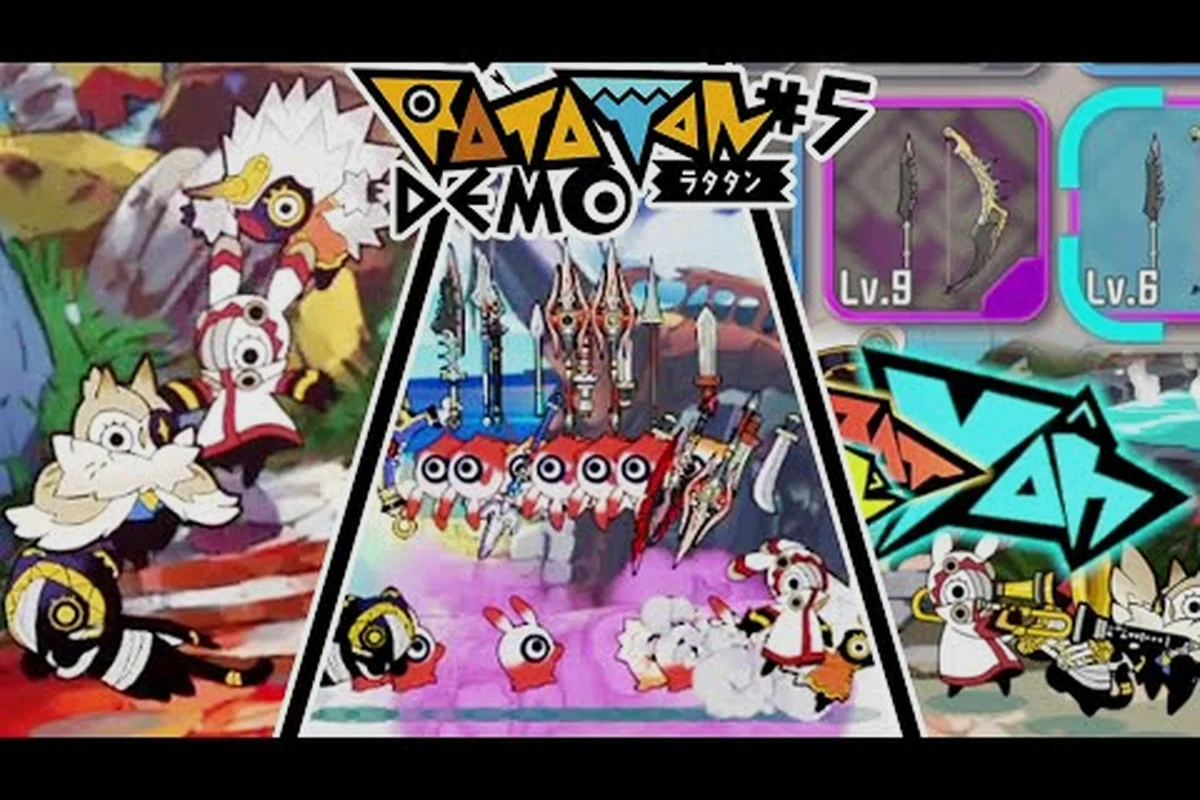
Ratatan multiplayer launched across PC, Switch 2, PS5, and Xbox Series X|S on October 14, 2026, after a Steam Early Access run that began September 18, 2025, and the release made four-player co-op a first-class feature rather than a bolt-on. According to the official Steam store page, the game is a rhythm roguelike action title with online co-op for up to four players and a massive melee that puts over 100 characters on the battlefield at once, which is why the multiplayer layer matters so much for the Version 1.0 experience. This guide covers every public detail of Ratatan multiplayer at launch, including the four-player cap, crossplay matrix, platform-specific subscription requirements, and the lobby flow you need before queuing into a run.
Ratatan Multiplayer Modes and Player Caps
Ratatan's co-op system is built around two distinct pillars: online co-op for remote squads and local co-op for couch play, both capped at four players per session. The four-player ceiling is consistent across every supported platform, and the rhythm-based combat design means the action stays readable even with a full lobby on screen. Each player controls a different Ratatan (the small warrior characters you recruit during runs), and the screen fills with rhythm inputs, melee swings, and ability bursts that the developers tuned around the four-player maximum.
The game does not offer asymmetric player counts above four, and there is no eight-player or twelve-player mode at launch, even though the on-screen melee can technically render more than 100 characters. The four-player cap is a combat-readability decision: the rhythm timing windows and boss telegraph cues are designed for squads of two to four, and the developer FAQ notes that the melee crowd is filled by AI-controlled allies summoned through gameplay rather than by additional human players.
Online Co-Op Overview
Online co-op is the headline mode and supports the full four-player cap on every platform where Ratatan is sold. Sessions are hosted through a room-code system (described in the matchmaking section below), and the developer FAQ confirms that progression and unlocks earned in online co-op carry over to the host's save file. The mode is built around shared health pacing, so a downed teammate can be revived within a short window, and the boss damage thresholds scale to the live player count rather than the lobby size.
According to the official FAQ, the online co-op mode requires a stable broadband connection and a current-generation platform account, with specific subscription requirements detailed in the platform section below. Players who drop from a session mid-run are replaced by an AI ally for the remainder of the encounter, and rejoining the original run is not supported once a player leaves, which is a design choice that rewards committing to a full run rather than dipping in and out.
Local Co-Op Overview
Ratatan local co-op supports up to four players on a single screen using standard controller pairs or mixed input schemes. The Switch 2 version, documented on the official Nintendo product listing, supports local co-op with the Joy-Con 2 controllers included with the console, and the physical release ships on a game card rather than as a download-only game-key card. Local play skips the room-code flow entirely and starts from the main menu, which makes it the easiest entry point for a couch session.
| Mode | Player Cap | Input | Network Required | Save Owner |
|---|---|---|---|---|
| Online Co-Op | 4 | Per-player controller | Yes (broadband) | Host |
| Local Co-Op | 4 | Shared / split controllers | No | Shared |
| Single Player | 1 | Controller or KBM | No | Local |
| Welcome Mode (Co-Op) | 4 | Mixed | Optional | Host |
The Welcome Mode entry above refers to a difficulty tier that the developer has flagged as the recommended starting point for new co-op squads, and it is described in more detail in the lobby and difficulty sections below. Welcome Mode is selectable from the multiplayer lobby regardless of whether the session is online or local, and it adjusts boss health and enemy density to a level that is forgiving for first-time four-player runs.
Ratatan Crossplay Rules by Platform
Crossplay is the most misunderstood part of Ratatan multiplayer at launch because the rules are not uniform across all four platforms. The Version 1.0 build supports crossplay between PC (Steam) and Xbox Series X|S, and between PC (Steam) and Switch 2, but the PlayStation 5 version is currently crossplay-restricted to other PS5 players. According to the PlayStation Store listing, cross-play support for the PS5 version is planned for the near future rather than available at launch, so PS5 squads can only team up with other PS5 accounts at the time of writing.
This partial crossplay matrix is consistent with the official Nintendo FAQ, which confirms that cross-play works with Steam and Xbox Series X|S but not yet with PlayStation 5, and it is the same matrix reflected on the Steam and Xbox product pages. The split is not a technical limitation of the Switch 2 hardware, since the Switch 2 version already cross-plays with Steam, and the official FAQ frames the PS5 omission as a temporary rather than permanent state.
Crossplay Compatibility Matrix
The table below summarizes the crossplay state at launch for every platform pair. A check mark means a player on platform A can join a lobby hosted by a player on platform B; a cross means cross-play is not currently supported for that pair.
| Platform | Steam (PC) | Switch 2 | PS5 | Xbox Series X|S |
|---|---|---|---|---|
| Steam (PC) | ✅ | ✅ | ❌ | ✅ |
| Switch 2 | ✅ | ✅ | ❌ | ✅ |
| PS5 | ❌ | ❌ | ✅ | ❌ |
| Xbox Series X|S | ✅ | ✅ | ❌ | ✅ |
Save data does not transfer between platforms, so a progress file started on PS5 stays on PS5, and the same rule applies to every other platform pair. This is documented on the PlayStation Store listing and on the Steam store page, and it is the same reason the developer does not currently advertise a single cross-save profile for the game. Players who want to keep their multiplayer progression portable should treat one platform as their primary account and avoid spreading unlocks across multiple stores.
What Changes for Crossplay Squads
When crossplay is enabled, the lobby owner can set a platform filter to restrict or open the room, and the host's region settings determine the matchmaking pool. The session itself is region-agnostic inside the same platform cluster, so a Steam host in Europe can invite a Switch 2 player in North America into the same lobby without a region lock. Voice chat is handled by the platform's native system (Steam Voice, Switch 2 native chat, Xbox party chat, or PS5 party chat) rather than by an in-game channel, and the developer recommends using a headset for boss-call coordination.
Platform-Specific Setup and Subscription Requirements
Each platform has a slightly different setup path for Ratatan online co-op, and three of the four require an active subscription on the platform's online service. Players who only plan to use local co-op can skip the subscription entirely on every platform, because the subscription requirement only applies to the online co-op mode and to cross-platform play. The table below shows the per-platform subscription requirement and the version status.
| Platform | Online Co-Op Sub | Local Co-Op Free | Crossplay Partners | Version Status |
|---|---|---|---|---|
| Steam (PC) | None | Yes | Switch 2, Xbox | Released |
| Switch 2 | Nintendo Switch Online | Yes | Steam, Xbox | Released (card) |
| PS5 | PlayStation Plus | Yes | PS5 only (at launch) | Released |
| Xbox Series X|S | Xbox Game Pass Core / Online | Yes | Steam, Switch 2 | Released |
Steam (PC) Setup
On Steam, players launch the game, open the Multiplayer menu, and either host a room or enter a friend's room code. No subscription is required for online co-op on PC, and crossplay is available from the lobby browser by default. The Steam version is the one the developer uses as the master build, so patches and balance updates typically land on Steam first and roll to consoles shortly after.
Switch 2 Setup
The Switch 2 version requires an active Nintendo Switch Online subscription for online co-op, and the subscription is checked at the lobby screen before the room opens. Local co-op does not require NSO, and the physical release is a standard game card. According to the Nintendo Switch 2 product listing, a version for the original Nintendo Switch is not part of the launch lineup, so Switch 2 is the only current-generation Nintendo platform for the game at this time.
PlayStation 5 Setup
The PS5 version requires PlayStation Plus for online co-op, and crossplay with Steam, Switch 2, and Xbox is not available at launch. The PlayStation Store listing explicitly notes that cross-play support for the PS5 version is planned for the near future rather than available at launch, which means PS5 players should plan their multiplayer around PS5-only squads until the next patch enables cross-platform rooms. Save data also does not transfer to other platforms from PS5, so PS5 progression is its own ecosystem.
Xbox Series X|S Setup
The Xbox version requires an Xbox Game Pass Core or equivalent online subscription for online co-op, and crossplay with Steam and Switch 2 is enabled from the lobby screen. Like the Steam version, the Xbox build pulls from the same update branch, so patches land in parallel with the PC build. Xbox players who want the simplest cross-platform experience can use the Xbox mobile app for party chat on the go, which the developer FAQ does not officially endorse but does not block either.
How to Start a Ratatan Online Co-Op Session
The lobby flow for Ratatan online co-op is room-code based rather than friend-list based, and the steps are the same on every platform that supports online co-op. The room-code system was chosen by the developer so that cross-platform squads can connect without linking platform accounts, and the code itself is a six-character alphanumeric string that expires when the host closes the lobby. For a deeper walkthrough of the room-code flow, the Ratatan cross-platform guide covers the same flow from a matchmaking angle.
Host Flow
The host opens Multiplayer from the main menu, selects Host Session, and chooses a difficulty (Welcome, Normal, or Hard). The game then generates a six-character room code that the host shares with friends over chat. The host can toggle crossplay on or off before locking the lobby, and the toggle determines whether the room is visible to players on other platforms.
| Step | Action | Detail |
|---|---|---|
| 1 | Open Multiplayer | Main menu entry |
| 2 | Select Host Session | Choose difficulty |
| 3 | Toggle crossplay | On for cross-platform squad |
| 4 | Share room code | Six characters |
| 5 | Wait for joins | Up to four players |
| 6 | Lock and start | Begins the run |
Join Flow
Players who receive a room code open Multiplayer, select Join Session, enter the six-character code, and wait for the host to lock the lobby. If the host has crossplay enabled, the joining player can be on any supported platform, and the game handles the platform handshake automatically. The developer notes that region is matched inside the platform cluster, so a Steam player in Europe will not be auto-paired with a Switch 2 player in Asia unless they explicitly share a code.
Lobby Etiquette and Welcome Mode
For first-time squads, the developer recommends starting on Welcome Mode, which is a difficulty tier that scales boss health and enemy density down to a level appropriate for new players. Welcome Mode is the same setting that the Ratatan content creator guide recommends for streamers running their first few public lobbies, because it gives the audience time to learn the rhythm windows without wiping on the first boss. Once the squad is comfortable, the host can bump the lobby to Normal or Hard from the same menu.
Ratatan 4-Player Co-Op Strategy and Boss Tips
A full four-player Ratatan squad is the most chaotic and most rewarding way to play the game, because the on-screen melee can swell past 100 characters once every player summons their rhythm-locked allies. The boss health bars scale to the live player count, so a four-player run takes longer per boss than a solo run, but the damage output from four synchronized rhythm bursts makes the trade-off worth it for most squads. For players who want to optimize damage per run, the Ratatan weapon leveling guide breaks down how weapon XP scales across a co-op session.
Role Splitting for a Full Squad
A four-player lobby usually settles into a rough two-and-two role split: two players focus on Rhythm Bursts (the timed input windows that deal heavy damage), and two players focus on Summon Density (building the melee crowd that tanks hits and adds chip damage). The split is not enforced by the game, and squads that run four rhythm-burst players can clear bosses faster but are more fragile because they have fewer summoned allies absorbing damage.
| Role | Strengths | Weakness | Best For |
|---|---|---|---|
| Rhythm Burst | High burst damage | Low HP pool | Boss phase transitions |
| Summon Density | High survivability | Slow boss kills | Trash mob clears |
| Hybrid | Balanced | Harder to master | Mixed encounters |
| Support Reviver | Keeps squad alive | Low damage | Hard difficulty |
Boss Callouts and Pacing
Bosses in Ratatan telegraph their heaviest attacks with a distinct rhythm cue, and the four-player squad needs at least one player calling out the cue so the others can dodge or block. The developer designed the rhythm system so that a well-timed dodge also triggers a small damage window, which rewards squads that learn the boss rhythm together rather than memorizing a rotation. A common community report is that the second-phase enrage timer on the Crimson Warden boss is the first real wall for a four-player squad, and that adding a support reviver to the role split is the cleanest fix.
Save Data and Progression in Co-Op
According to the developer FAQ, progression and unlocks earned in a co-op run are saved to the host's profile, and the host's save file is the one that receives the post-run rewards. This is a deliberate design choice to keep progression ownership clear, and it means a player who joins a friend's lobby should treat the run as a co-op experience rather than a personal progression boost. For players who want solo progression between co-op sessions, the game supports a separate single-player save on the same platform, and switching modes does not overwrite the other save.
Ratatan Multiplayer Connection Issues and Fixes
Connection issues are the most common complaint in early Ratatan multiplayer sessions, and the developer has documented the typical causes on the official FAQ. The most frequent issues are platform subscription lapses, crossplay mismatches (a PS5 player trying to join a Steam lobby), and outdated client versions. The table below summarizes the most common issues and the recommended fix for each.
| Symptom | Likely Cause | Fix |
|---|---|---|
| "Online Co-Op Unavailable" | Lapsed NSO / PS Plus / Xbox sub | Renew the subscription |
| "Room Not Found" | Wrong code or crossplay mismatch | Confirm the platform and code |
| "Version Mismatch" | Client out of date | Restart the game to apply the patch |
| "Connection Timeout" | NAT type strict or region mismatch | Check NAT type, retry on the host's region |
| "Lobby Locked" | Host started without enough players | Wait for the host to re-open the lobby |
For deeper NAT and matchmaking troubleshooting, the Ratatan Switch 2 multiplayer guide covers the Switch 2-specific connection issues and the recommended router settings for stable lobby hosting. The developer also recommends a wired connection for the host whenever possible, because the rhythm-based combat is timing-sensitive and a single dropped packet can desync the boss timer.
Frequently Asked Questions
Does Ratatan multiplayer support crossplay between PS5 and Steam?
Not at launch. According to the official PlayStation Store listing, cross-play support for the PS5 version is planned for the near future rather than available at launch, so PS5 players can only team up with other PS5 accounts in the current build.
How many players can join a Ratatan co-op session?
Ratatan 4 player co op is the maximum, and the cap applies to both online and local co-op. The four-player ceiling is consistent across Steam, Switch 2, PS5, and Xbox Series X|S, and the game does not offer a higher player count at this time.
Do I need Nintendo Switch Online to play Ratatan online co-op on Switch 2?
Yes. The official Nintendo FAQ confirms that online co-op on Switch 2 requires a Nintendo Switch Online subscription, and the requirement is enforced at the lobby screen before the room opens. Local co-op on Switch 2 does not require a subscription.
Can I transfer my Ratatan save between PC and console?
No. Save data cannot be transferred between platforms, so a progress file started on PS5 stays on PS5, and the same rule applies to every other platform pair. Players who want portable progression should pick one platform as their primary account and stick with it.
What is the best difficulty for a new four-player squad?
The developer recommends Welcome Mode for first-time four-player squads, because it scales boss health and enemy density down to a forgiving level. Once the squad is comfortable with the rhythm windows and boss telegraphs, the host can bump the lobby to Normal or Hard from the same menu.